Conduktor.io
This case study highlights the importance of user-centered design in improving the usability of a heavy-data tool for developers. By simplifying the platform's structure, and introducing clear calls to action, we were able to create a modern and engaging user experience that had a significant impact on the user's workload.

Context
Setting up an Apache Kafka infrastructure is very complex and requires a high level of expertise with this technology. Hence, our desktop app was built having in mind the most experts in Apache Kafka as users, which led to creating an app with a high number of very detailed use cases, resulting in a highly complex usability, as well as a list of legacy features that weren’t being used by their customers due to the difficulty to use them.
Due to the complexity of re-shaping our desktop app we wanted to take this as an opportunity to build a web-based platform to help our users manage their Apache Kafka tasks in an easier and more delightful way.

Filter search from the intitial Desktop app

Landing screen of the Desktop app

Topics list the Desktop app
Research
To improve our users experience and create a new platform that would bring value to their daily work, we devided our research into two phases.
The aim of the initial phase of our research was to understand how our users interacted with our Desktop app. For this, we used Mixpanel to analyse how our customers where using every feature of our app, as well as measuring what were our customers' usability patterns.

Insights
With our research, we realised that even though managing and setting up an Apache Kafka infrastructure is very complex and requires a high level of expertise with this technology, nowadays most development teams working at companies using Kafka, are formed by teams with developers that are less knowledgeable in Kafka. hence need an easier approach to handle their infrastructure as well as being educated along the way while using the platform.
Solution
We realised as well that the journey of our Desktop App was built in a similar way as when managing Kafka with the console: run Kafka > access the Cluster > access the Topic to work with > filter to find the Messages to work with. However, most companies had dedicated teams dealing with different areas of their infrastructure, meaning most of our customers would rarely change between Clusters or even Topics.
We wanted to build a platform that made their daily work easier, helping them increase their productivity and efficiency whilst learning and enjoying the journey along the way.
For the initial round we focused on getting the right user experience, functionality and structure of our platform in place. Providing education Creating all of our components in a scalable way using Radix to ensure we'd be able to update them easily when we'd implement the new branding we were working on simultaneously as we built our platform.

View of the Kafka Connectors list from the new web app
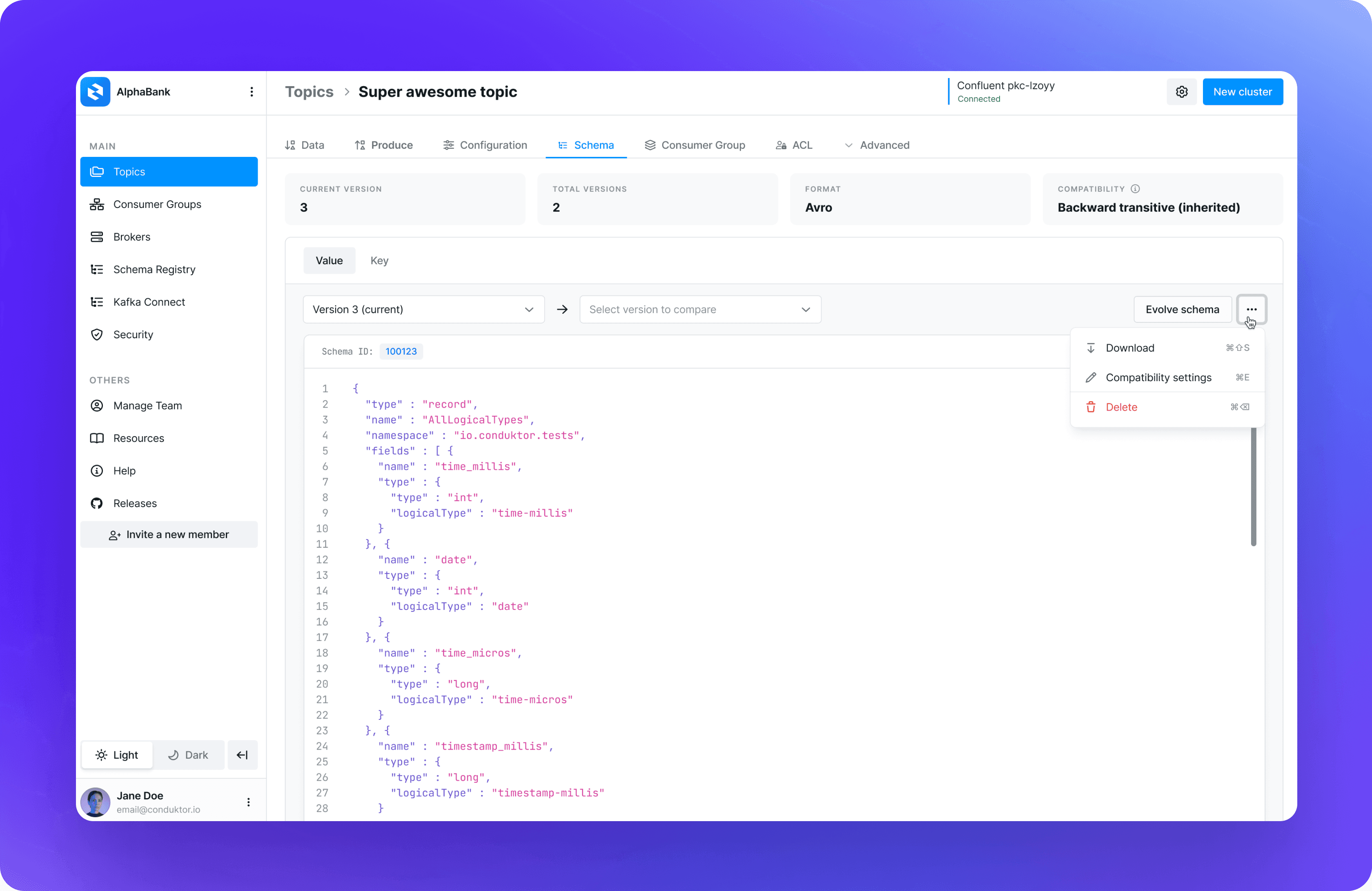
View of the Topic Schema from the new web app

View of the Cluster Settings

View of the Topic list with the Timestamp filter opened
Outcome
Once we had all our new platform launched, we implemented the new branding, including a new dark mode view, adapting the components to the new styles, as well as creating customised icons to represent our different product solutions, and iterating and implementing changes to some of our features based on the newly acquired feedback from our first users.

View of the Topics List with the Custom JS Filtes, with the new branding implemented

Set of custom icons I designed for all of our product solutions

View of the custom icons implemented in our Solutions menu

Detailed view of the Kafka Connector

View of the Topics List in Dark Mode